Reviewer handbook > FAQ
¶ Why do I not receive emails from the conference?
If you think you should have received an email from the conference, either to be invited as a reviewer or to get notified of your assignments, but did not, it can be for several reasons:
- The email has been filtered in your spam. Check your spam folder for emails coming from “Microsoft CMT <email@msr-cmt.org>”.
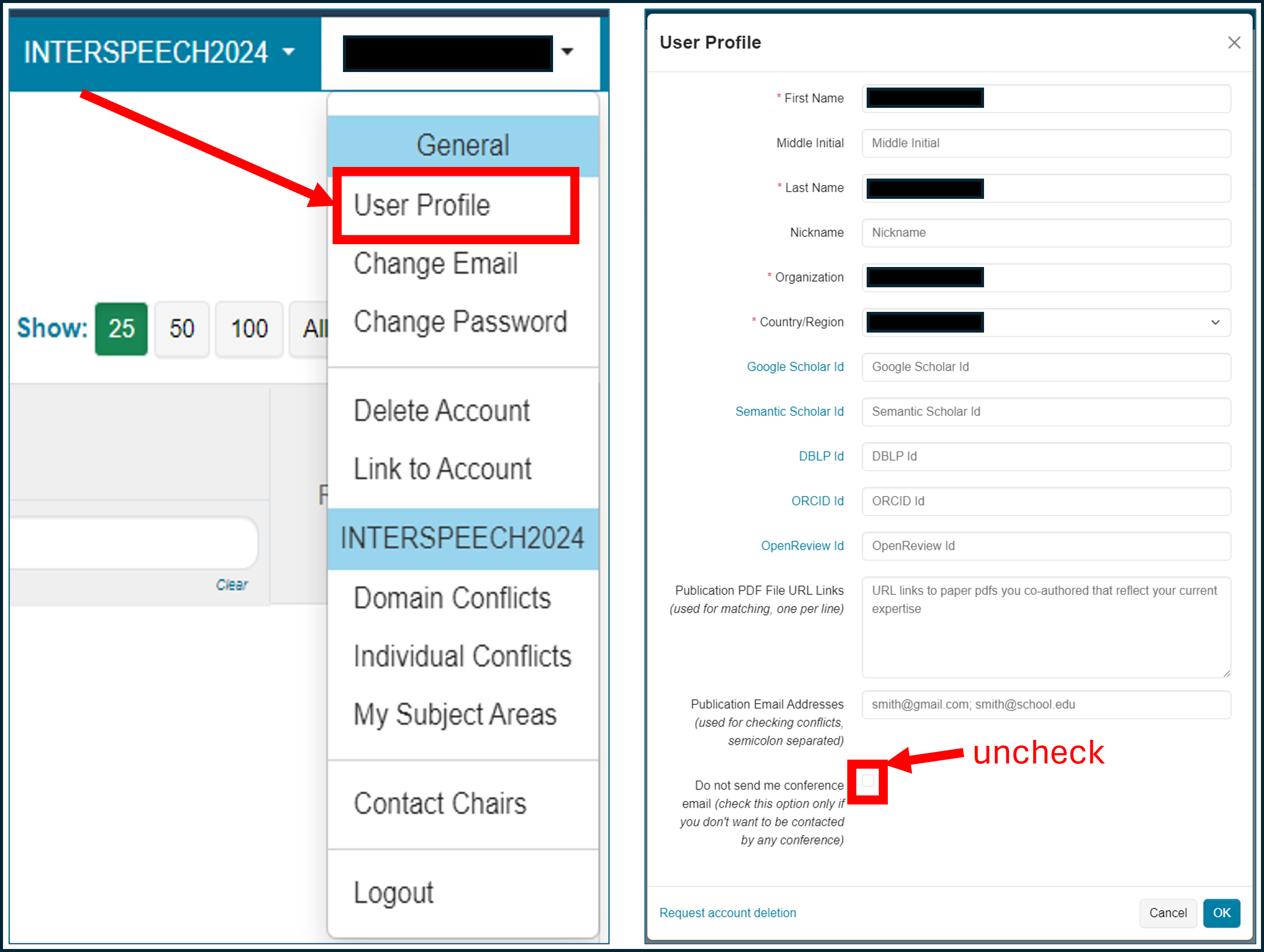
- You have blocked conference emails in CMT. You can uncheck this box by logging in in CMT, go to your profile (Click upper right on your name → User Profile ) and uncheck “Do not send me conference email”. If you were expecting an invitation to become reviewer, send then an email to the ISCA Conference Coordinator and we will issue a new invitation for you:
For any question, please contact the ISCA scientific coordinator.
¶ CMT
¶ What conference software management does Interspeech use?
Since 2023, Interspeech uses Microsoft's Conference Management Toolkit (CMT). It might change again in the future, but switching conference management platform is a big challenge, so that any decision regarding this aspect is taken very cautiously.
¶ Can I accept the invitation without a CMT account?
No.
The review process is entirely managed through CMT and unfortunately you cannot review for Interspeech outside CMT.
¶ I have accepted the invitation but still cannot see my role as Reviewer in CMT, what is going wrong?
Very likely you have attempted to accept the invitation but the process did not complete. Two scenarios are quite common:
- You have attempted to accept the invitation with a CMT account corresponding to a different email address than the one used to invite you. This cannot work. Note that some organisations redirect emails without the user being aware of (for instance *@myorganisation.co.uk towards *@myorganisation.com), so that you cannot know to which email the invitation was sent. In that case, please reply to the invitation email, and we will solve this issue.
- You have clicked on the Accept link and created a new CMT account once redirected on the CMT welcome page. In that case, please make sure to return to your invitation email and click again on the Accept link once your new account is created to finalise the process.
¶ I have created a CMT account as requested in the invitation email but still can't accept the invite, what is going wrong?
Very likely the CMT account you have created corresponds to a different email address than the one used to invite you. This cannot work. Note that some organisations redirect emails without the user being aware of (for instance *@myorganisation.co.uk towards *@myorganisation.com), so that you cannot know to which email the invitation was sent.
Please reply to the invitation email, and we will solve this issue.
¶ When I click on the link to accept the invitation, I get “The invite is invalid or expired” although it is supposed to expire late. What happens?
Very likely we have sent you a reminder that invalidates the links of the first invitation. Any new invitation invalidates the links of previous invitations.
Please check your emails and find the last invitation email.
If the problem persists, please reply to the invitation email, we will solve this issue.
¶ I have a CMT account with another email address that the one used to invite me, what can I do?
Two options:
- Create a new CMT account with the same email address as the one used to invite you and accept the invitation.
- Reply to the invitation email by indicating the CMT email address which you would like to use, and we will re-issue an invitation.
¶ How can I set up the maximum number of papers I agree to review?
In CMT, this number is referred to as “Quota”.
You set your quota when accepting the invitation.
You can request for this quota to be updated at any time by contacting the conference chairs (Click upper right on your name → Contact Chairs).
Note that this quota is a strict limit and we will not assign you more submissions to review. Later in the review process, you might be approached by an Area Chair (Meta-Reviewer in CMT) to check whether you agree to review one or more additional submission(s) if they think you are the appropriate reviewer.
¶ Submission-reviewer assignment
¶ How does the reviewer assignment process work?
Interspeech typically receives more than 2000 submissions that require 3 independent reviewers for each of them. Given these numbers, reviewers are assigned automatically to submissions. Manual checks and manual re-assignments are performed in a second step.
CMT provides an automatic assignment tool based on the following parameters:
- Bids provided by the reviewers who selected the submissions they would like to review (not used)
- Suggestions provided by reviewers or meta-reviewers for specific submissions (not used)
- Matching the Subject Areas (thereafter Relevance)
- TPMS score (thereafter TPMS) - See What is TPMS? in this FAQ for further details.
For information, here are the custom weights used by Interspeech 2023 and 2024 organisers for the automatic assignment:
| Bids | Relevance | Suggestions | TPMS | |
|---|---|---|---|---|
| 2023 | 0 | 0.5 | 0 | 0.5 |
| 2024 | 0 | 0.4 | 0 | 0.6 |
| 2025 | 0 | 0.3 | 0 | 0.7 |
| 2025 | 0 | 0.3 | 0 | 0.7 |
Feedback from previous Interspeech conferences suggests that reviewers having properly set up their TPMS account ended up with much more accurate assignments than reviewers without a TPMS account (and relying only on the selected Subject Areas).
This provides a first set of assignments. Area Chairs (Meta-Reviewers in CMT) are then in charge of manually checking the assignments and possibly manually changing them before sending the assignments to the reviewers.
¶ What is the difference between primary and secondary Subject Areas?
Primary Subject Areas will have more weight than Secondary Subject Areas during the automatic paper assignment: see how relevance scores are calculated.
It is therefore important to select a Primary Subject Area.
Note that you can select only one Primary Subject Areas but several Secondary Subject Areas. Please choose your Primary Subject Area carefully.
¶ What is TPMS?
Toronto Paper Matching System (TPMS) is a system that calculates a matching score between a reviewer and a list of submitted papers. The matching score is based on the content of the scientific papers written by the reviewer and the content of the submissions. It provides a much more accurate matching than the traditional one based on the Subject Areas selected manually by the reviewer.
To be used successfully, it requires that reviewers register to TPMS with the same email address as the CMT account email address and upload their own papers representative of their scientific profile.
Further details on TPMS can be found on their about-us page.
¶ What happens if I do not provide my Semantic Scholar ID in CMT?
Nothing.
If in addition you do not have a TPMS account, you will be assigned to submissions based only on the Subject Areas that you have manually selected in CMT. This might be less accurate than using a TPMS account (that can be created and pre-populated automatically for you if you provide your Semantic Scholar ID).
Note that in our attempt to assign accurate reviewers to submissions, we might manually recover your Semantic Scholar ID and create a TPMS for you that we might use during the assignment process. Please see How does the reviewer assignment process work? for further details on the assignment process.
¶ Why such a focus on the Semantic Scholar ID?
Our objective is to help reviewers to have a complete TPMS account in order to get assigned papers that match well with their scientific expertise. For this purpose, with the help of the TPMS team, we attempt to pre-populate TPMS accounts of reviewers with publicly available papers. This way, reviewers can simply delete papers in their TPMS account which they don't want to be included. Unfortunately, Google Scholar does not allow to parse the page and download papers. Semantic Scholar does, and that is the reason why we encourage reviewers to provide their Semantic Scholar ID.
We are aware that it is not optimal and that Semantic Scholar tends to mix publications of authors with similar names.
As an alternative, do not provide your Semantic Scholar ID and populate your TPMS account yourself with your own papers. This is ultimately the best solution and this ensures that the uploaded papers fully correspond to the topics you are ready to review for.
¶ Where can I find my Semantic Scholar ID?
From the Semantic Scholar FAQ:
1. Find your author page using the search bar on www.semanticscholar.org.
- Search by author name: Enter the name you publish under. In the search results select the author tile that includes the majority of your papers. Note: To expand the tile section, select Show All Authors.
- Search by paper title: Enter your paper's title. In the search results click your hyperlinked name in the author list. Note: If your name is not yet hyperlinked to an author page, contact us.
2. On your author page, your Semantic Scholar ID is the numerical string at the end of the URL. Example: For www.semanticscholar.org/author/1741101, the Semantic Scholar ID is 1741101.
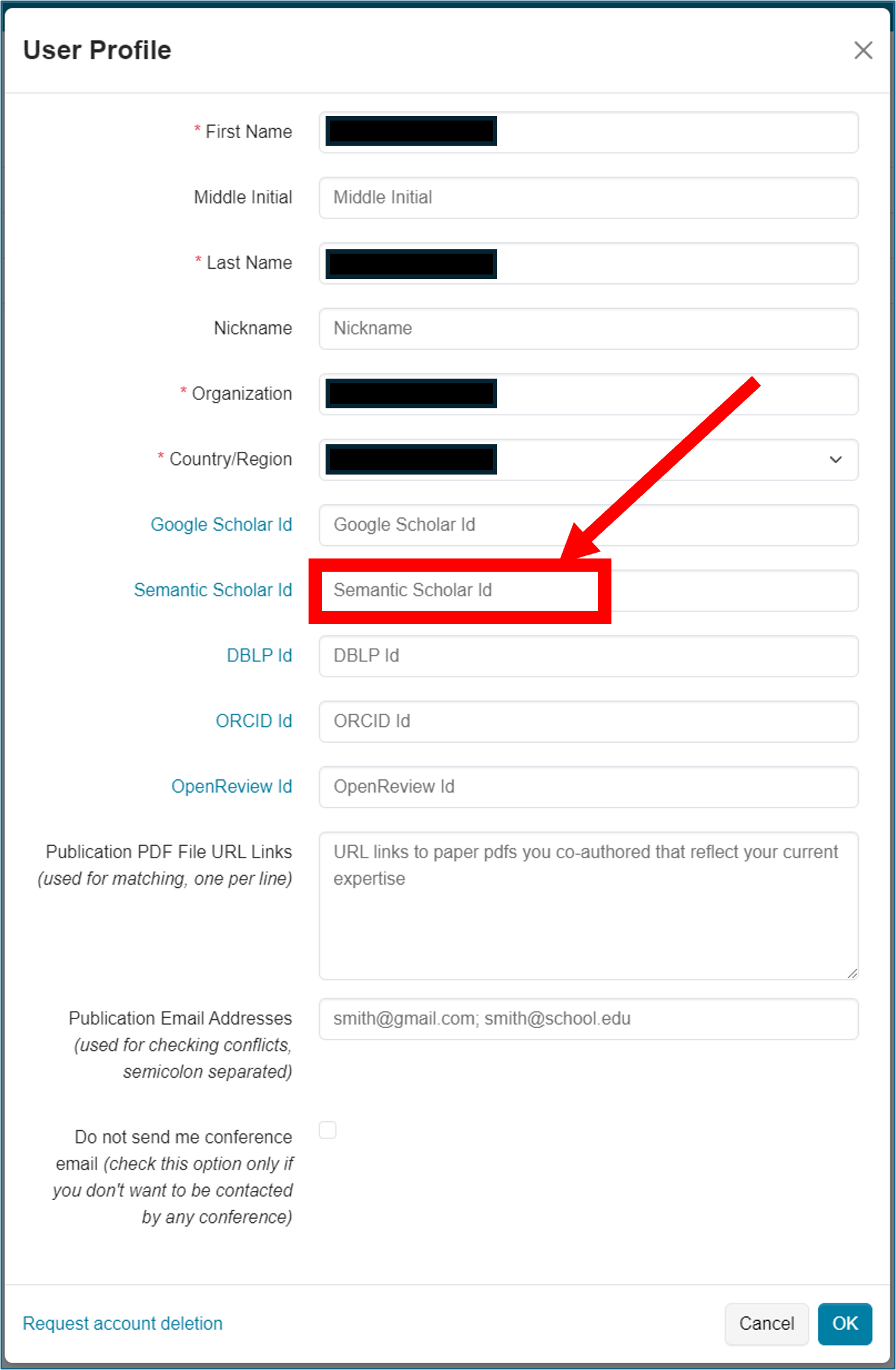
After you know this number, please go to your CMT user profile (upper right, click on your name → User Profile) and fill in the Semantic Scholar ID field with that number:
¶ I have already entered in CMT my Google Scholar ID, do I really need to enter my Semantic Scholar ID in addition?
Yes.
Your Semantic Scholar ID is used to create/update automatically your TPMS account. Your Google Scholar ID helps Area Chairs (Meta-Reviewers) to check your scientific profile.
¶ Can I use TPMS without having to upload my papers?
No and Yes.
No, because a TPMS account with papers representative of your scientific profile is useless. See the question How does the reviewer assignment process work?.
Yes, because if you provide your Semantic Scholar in CMT we will upload your papers available on your Semantic Scholar webpage for you, which is better than nothing.
¶ Is it important to update my TPMS account?
Yes, but it is not mandatory.
If you do not update it, it will contain all papers available on your Semantic Scholar page (assuming that you have provided your Semantic Scholar ID in CMT). It is better than nothing but might not fully represent your current scientific profile.
If you update it, you can shape your scientific profile and get submissions to review much more in line with your desired scientific profile.
See also How does the reviewer assignment process work? for more details.
¶ Is it mandatory to have a TPMS account to review for Interspeech?
No.
If you don't have a TPMS account, you will be assigned to papers based only on the Subject Areas that you have manually selected. Having a TPMS account ensures a more accurate assignment. See also How does the reviewer assignment process work? for more details.
¶ I have already provided my Semantic Scholar ID in CMT. Do I have to take any further action regarding TPMS?
No and Yes.
No, because a TPMS account will be automatically created for you and pre-populated with all papers available on your Semantic Scholar page. It is better than nothing but might not fully represent your current scientific profile.
Yes, because if you manually update the TPMS account that was created/updated from your Semantic Scholar ID, you can shape your scientific profile more accurately and get submissions to review much more in line with your desired scientific profile.
See also How does the reviewer assignment process work? for more details.
¶ How can I make sure that TPMS is not used for me?
If you do not have a TPMS account with the same email address than your CMT account AND if you do not provide your Semantic Scholar ID in CMT, you will be assigned to submissions based only on the Subject Areas that you have manually selected in CMT. This might be less accurate than using an updated TPMS account (see also How does the reviewer assignment process work? for more details).
Note however that in our attempt to assign accurate reviewers to submissions, we might manually recover your Semantic Scholar ID and create a TPMS for you that we can use during the assignment process.
¶ Reviewing
¶ When are the papers ready to review?
After the end of the paper update deadline, there is a lot of work for the TPC Chairs and the Area Chairs (Meta-Reviewers in CMT) to prepare the papers for review. There are a lot of formatting issues to solve, ethical issues, non-respect of the double-blind rule, wrong area chosen by the authors, desk-reject, etc.
After this is done, the submissions are assigned automatically to the reviewers and the Area Chairs then need to check the assignments for each paper and possibly modify them manually.
All this hard work typically takes one to two weeks and requires a lot of work from the TPC and Area Chairs. We are doing everything in our power to reduce this period to keep enough time for the reviewers to perform their review.
When the assignment is done, the reviewers are notified by emails that they can start their review.
¶ Why did I not receive the notification email?
Please see the related question.
¶ Why did some papers disappear from list of assigned papers?
For various reasons (author withdrawal, ethical issues, better paper-reviewer match, etc.) papers can be removed from your assignment list. No automatic email is being sent by CMT in that case. Be sure to regularly check your assignments to avoid proceeding with a review that is no longer needed.